Big Sur update files. Newest is always on top.
**If you have trouble downloading, copy and paste the link in a new tab or window, instead of clicking on it. You could also open in a incognito window. **
Big Sur update 11.6
http://swcdn.apple.com/content/downloads/57/38/071-97382-A_OEKYSXCO6D/97vrhncortwd3i38zfogcscagmpwksdzce/InstallAssistant.pkg
I haven’t updated this in a while, but here is a link for Monterey 12.5.1 for anyone who needs it:
https://swcdn.apple.com/content/downloads/18/44/012-51693-A_2W745BUZP7/xtd63whw506llesta7af6cjvcxlyj8mxvf/InstallAssistant.pkg
Download and run the InstallAssistant.pkg file from the link above. At this point, you have not yet done the update. After you have installed InstallAssistant.pkg, go to Finder, then Applications. You will have an app named “Install macOS Big Sur”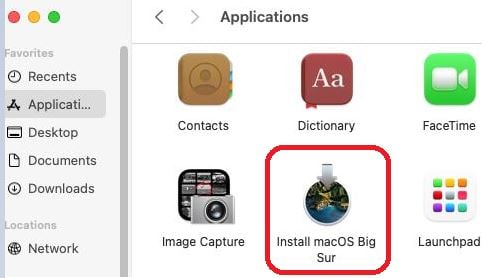
Open this app and follow the prompts. Your mac should eventually reboot to finish the update. The new app should be gone from your applications, and you can delete the InstallAssistant.pkg file you downloaded.
—————————————————————————————-
Older updates (you shouldn’t need these)
11.5 http://swcdn.apple.com/content/downloads/49/54/071-71342-A_TOSWTG0P9A/0pl87hjdasybzmpr2liwamgm9pmmorqmzh/InstallAssistant.pkg
11.3 http://swcdn.apple.com/content/downloads/40/42/071-29172-A_50FL5BT4I6/5w0xm8c31yigcf2iov4n4mlsvnw1upzo2q/InstallAssistant.pkg
11.2.3 http://swcdn.apple.com/content/downloads/12/32/071-14766-A_Q2H6ELXGVG/zx8saim8tei7fezrmvu4vuab80m0e8a5ll/InstallAssistant.pkg
 MacOS on Windows with VMWare